Model diagnostics
This is where Ferrum's headline claim — model outputs are data — becomes specific code.
The diagnostic surface consists of three coordinated layers. You can mix and match them freely; they all return regular Chart objects (or compound views) that compose with the rest of the grammar.
| Layer | What it is | When to reach for it |
|---|---|---|
| Figure-level helpers | roc_chart, calibration_chart, confusion_matrix_chart, shap_beeswarm_chart, etc. |
One-line entry points. Takes a fitted model + test data, returns a Chart. |
ModelSource |
The data interface | When you want to compute derived diagnostic data once and reuse it across multiple charts. |
| sklearn-protocol visualizers | ROCVisualizer, CalibrationVisualizer, ConfusionMatrixVisualizer, etc. |
When you want lifecycle control (.fit() / .score() / .show()) or are following a yellowbrick-style pattern. |
The design rationale is on the Model outputs are data Concepts page; this page is the practical reference.
Figure-level helpers
The fast path: pass a fitted model and held-out data, get a Chart back. The helpers cover the standard model-evaluation surface and dispatch the underlying transforms in Rust.
import ferrum as fm
from sklearn.datasets import load_breast_cancer
from sklearn.ensemble import RandomForestClassifier
from sklearn.model_selection import train_test_split

data = load_breast_cancer()
X_train, X_test, y_train, y_test = train_test_split(data.data, data.target, random_state=0)
model = RandomForestClassifier(n_estimators=20, random_state=0).fit(X_train, y_train)

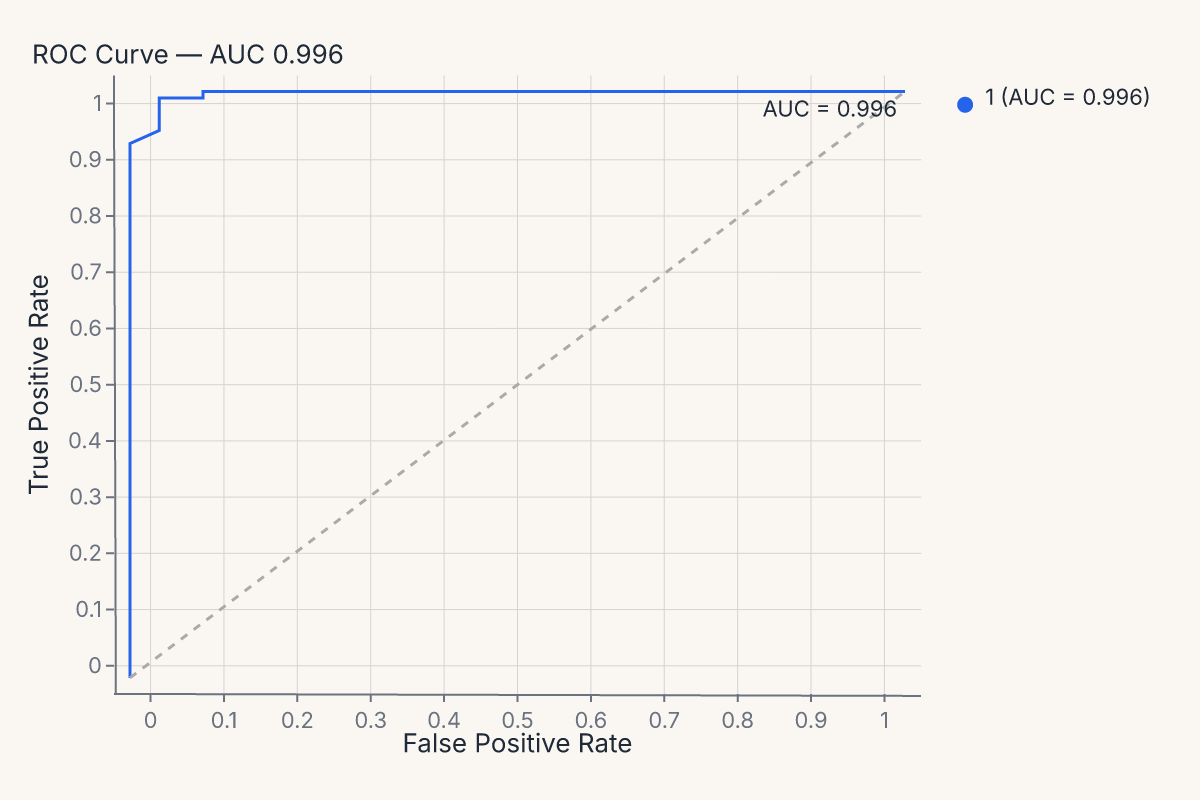
roc = fm.roc_chart(model, X_test, y_test)
roc
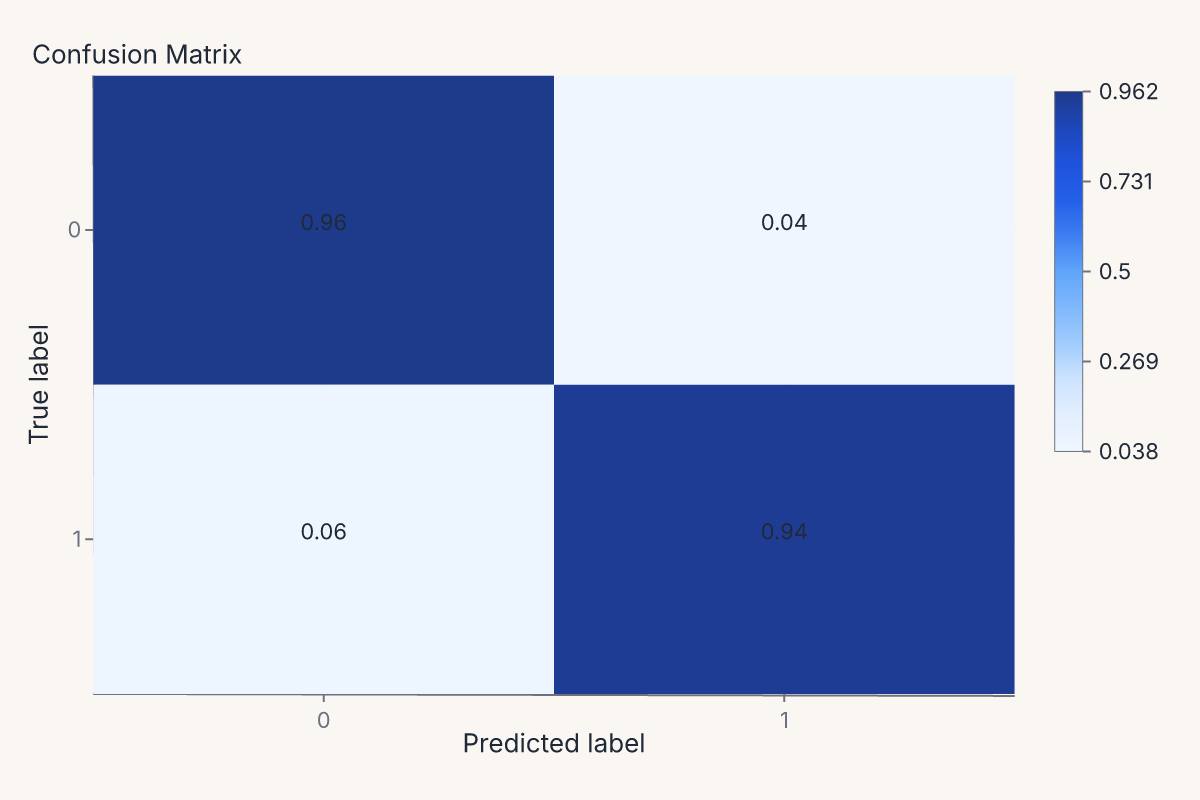
The same pattern produces a confusion matrix:
import ferrum as fm
from sklearn.datasets import load_breast_cancer
from sklearn.ensemble import RandomForestClassifier
from sklearn.model_selection import train_test_split

data = load_breast_cancer()
X_train, X_test, y_train, y_test = train_test_split(data.data, data.target, random_state=0)
model = RandomForestClassifier(n_estimators=20, random_state=0).fit(X_train, y_train)

cm = fm.confusion_matrix_chart(model, X_test, y_test, normalize="true")
cm
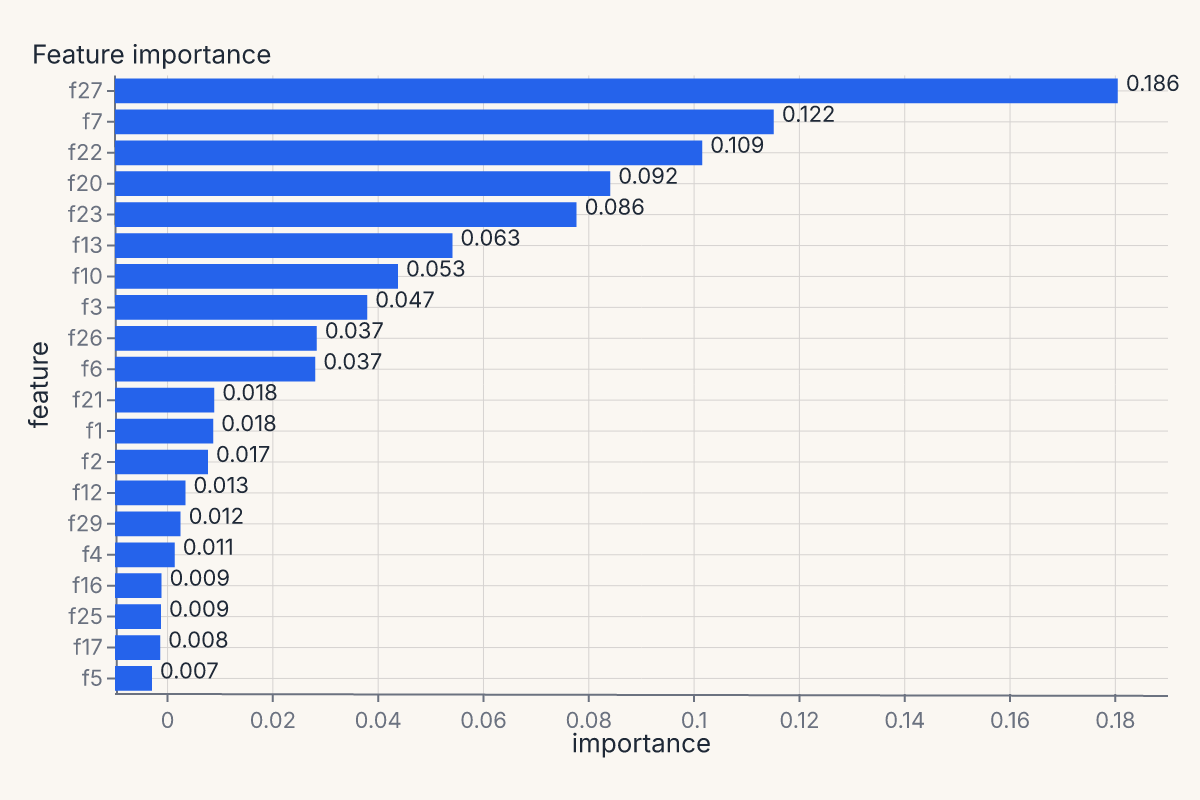
Or feature importances, with the helper handling whichever importance method the estimator exposes (feature_importances_, permutation importance, coefficients):
import ferrum as fm
from sklearn.datasets import load_breast_cancer
from sklearn.ensemble import RandomForestClassifier
from sklearn.model_selection import train_test_split

data = load_breast_cancer()
X_train, X_test, y_train, y_test = train_test_split(data.data, data.target, random_state=0)
model = RandomForestClassifier(n_estimators=20, random_state=0).fit(X_train, y_train)

importances = fm.importance_chart(model, X_test, y_test)
importances
The full helper menu
Every helper follows the same signature shape: helper(model_or_source, X=None, y=None, **kwargs) -> Chart. Pass a fitted model + held-out data, or pass a pre-constructed ModelSource as the first argument (next section). All helpers accept a theme= keyword.
| Family | Helpers |
|---|---|
| Classification | roc_chart, pr_chart, calibration_chart, confusion_matrix_chart, class_prediction_error_chart, classification_report_chart, class_balance_chart, discrimination_threshold_chart, gain_chart, lift_chart |
| Regression | residuals_chart, prediction_error_chart, cooks_distance_chart |
| Feature explanation | importance_chart, shap_beeswarm_chart, shap_bar_chart, shap_waterfall_chart, pdp_chart |
| Model selection | learning_curve_chart, validation_curve_chart, cv_scores_chart, alpha_selection_chart |
| Clustering / manifold | silhouette_chart, elbow_chart, manifold_chart, pca_scree_chart, intercluster_distance_chart, parallel_coordinates_chart, decision_boundary_chart, rank1d_chart, rank2d_chart, cluster_diagnostics |
The full API surface is on the API Reference / plots page.
The fitted-model path (roc_chart(model, X, y)) needs scikit-learn — install it with pip install "ferrum-viz[models]". The precomputed y_true= / y_pred= path (below) needs no extra.
ModelSource: derived diagnostic data
ModelSource wraps a fitted estimator and held-out data, then exposes derived diagnostic tables (predicted probabilities, ROC curve points, calibration bins, confusion counts, residuals, SHAP values, partial dependence grids, ...) as polars DataFrames.
When you call roc_chart(model, X, y), the helper builds a ModelSource internally, asks it for the ROC curve points, and feeds those points to a chart spec. If you're computing multiple diagnostics on the same model + dataset, it's more efficient — and cleaner — to build the ModelSource once and pass it to each helper:
import ferrum as fm
from sklearn.datasets import load_breast_cancer
from sklearn.ensemble import RandomForestClassifier
from sklearn.model_selection import train_test_split

data = load_breast_cancer()
X_train, X_test, y_train, y_test = train_test_split(data.data, data.target, random_state=0)
model = RandomForestClassifier(n_estimators=20, random_state=0).fit(X_train, y_train)

source = fm.ModelSource(model, X_test, y_test)
roc = fm.roc_chart(source)
cm = fm.confusion_matrix_chart(source)
importances = fm.importance_chart(source)
report = (roc | cm) & importances
report
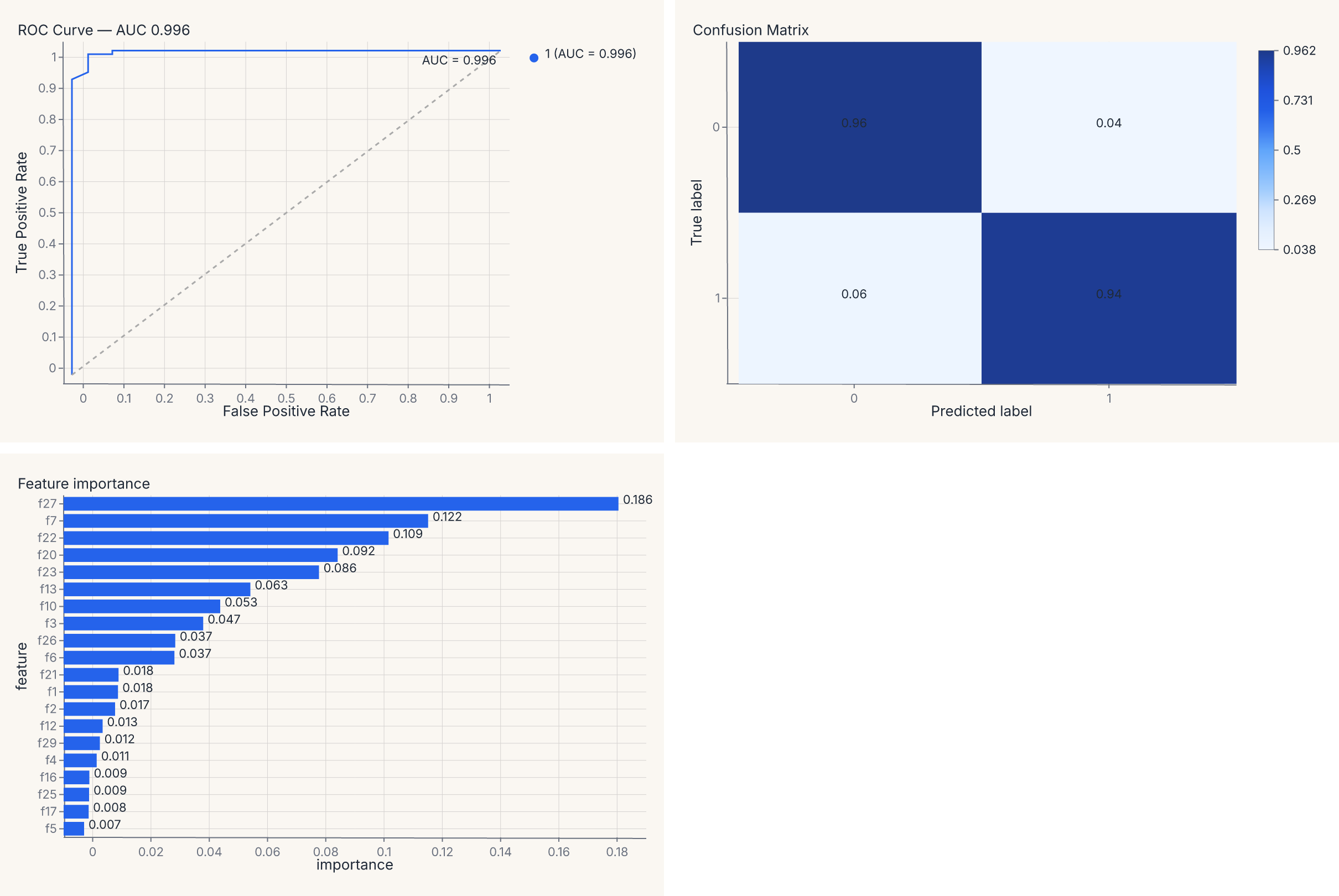
The report value is a regular composed chart — (roc | cm) & importances lays the three diagnostics into a 2 × 2 grid (with the importance chart spanning the bottom row), and you can save it, theme it, or further compose it as one artifact. The composition operators are the same | and & you use for any other charts (see Composition).
Why ModelSource matters
The boundary ModelSource enforces is the load-bearing one: it computes the derived diagnostic tables once, then every chart consumes the result. Without ModelSource, computing a ROC curve and a calibration curve on the same model would re-predict probabilities twice, and you'd have to thread that data plumbing through your own code.
ModelSource also lazy-imports sklearn and shap as needed: import ferrum does not pull those packages into your process. (UMAP embeddings run in pure Rust, so no Python umap package is ever imported.) They load only when you actually compute a diagnostic that requires them — and only on the fitted-model path. The raw-array path (below) computes its metrics on Ferrum's native Rust kernels and imports none of them.
Comparing multiple models
Most classification helpers accept a compare= keyword for side-by-side multi-model comparison on the same test set. Pass a dict mapping display names to fitted estimators:
import ferrum as fm
from sklearn.datasets import load_breast_cancer
from sklearn.ensemble import RandomForestClassifier
from sklearn.linear_model import LogisticRegression
from sklearn.model_selection import train_test_split

data = load_breast_cancer()
X_train, X_test, y_train, y_test = train_test_split(data.data, data.target, random_state=0)
rf = RandomForestClassifier(n_estimators=20, random_state=0).fit(X_train, y_train)
lr = LogisticRegression(max_iter=500, random_state=0).fit(X_train, y_train)

chart = fm.roc_chart(rf, X_test, y_test, compare={"Logistic Regression": lr})
chart
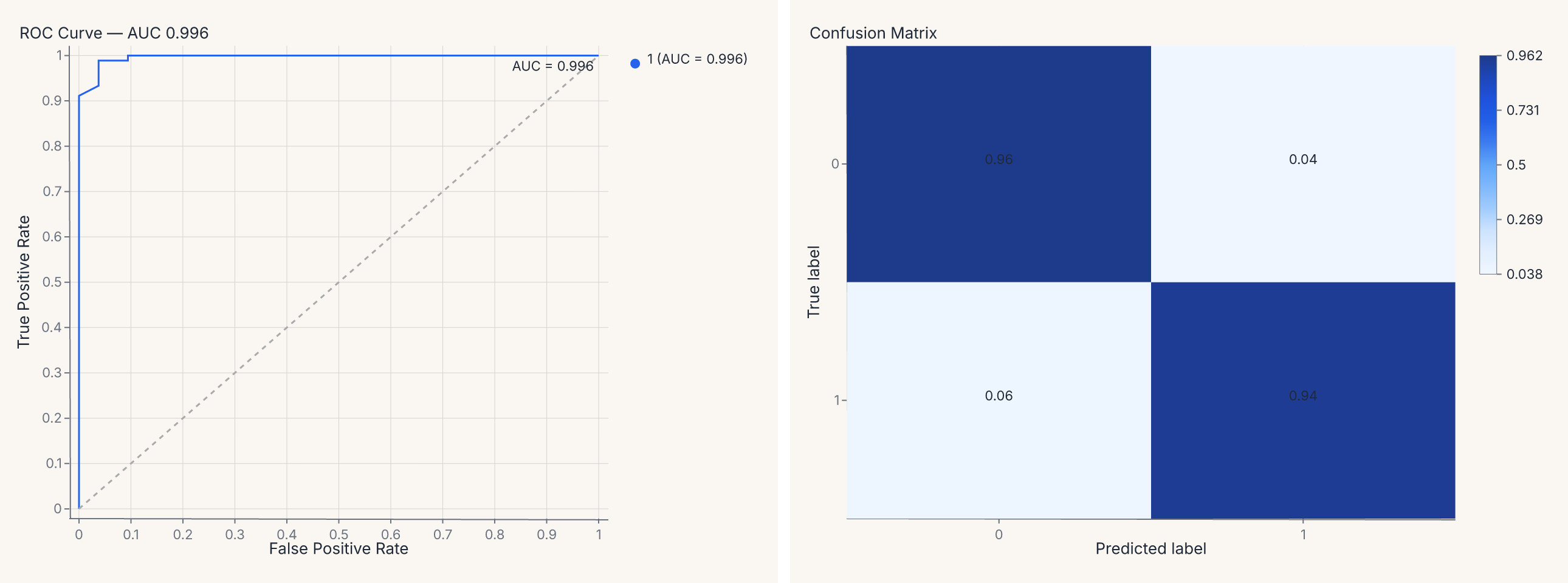
The base model is labeled "base" by default; each entry in compare= adds a named curve. The resulting chart overlays all models on the same axes with a color legend.
For full control, use ModelSource.compare() directly to build a ComparedModelSource and pass it to any helper:
cms = fm.ModelSource.compare(
    {"RF": rf, "LR": lr},
    X_test, y_test,
)
roc = fm.roc_chart(cms)
cal = fm.calibration_chart(cms)
report = roc | cal
report
ComparedModelSource computes derived data once per model and stamps a model column on the concatenated output, so charts can route color="model" automatically.
Precomputed scores (no model required)
Every classification and regression helper also accepts raw y_true= / y_pred= arrays instead of a fitted model. This is useful when you already have predictions — from a saved CSV, a batch inference job, a non-sklearn framework, or an evaluation pipeline that separates prediction from visualization. This path is fully sklearn-free: ROC, precision-recall, calibration, confusion-matrix, and threshold-sweep metrics are computed by Ferrum's native Rust kernels, so no [models] extra is required.
import ferrum as fm
from sklearn.datasets import load_breast_cancer
from sklearn.ensemble import RandomForestClassifier
from sklearn.model_selection import train_test_split

data = load_breast_cancer()
X_train, X_test, y_train, y_test = train_test_split(data.data, data.target, random_state=0)
model = RandomForestClassifier(n_estimators=20, random_state=0).fit(X_train, y_train)

# Predict once, visualize many ways
y_proba = model.predict_proba(X_test)
y_pred = model.predict(X_test)

roc = fm.roc_chart(y_true=y_test, y_pred=y_proba)
cm = fm.confusion_matrix_chart(y_true=y_test, y_pred=y_pred)
report = roc | cm
report
The two paths are mutually exclusive — pass either model, X, y or y_true=, y_pred=, not both.
What y_pred means
The interpretation of y_pred depends on the chart:
| Chart needs | What to pass as y_pred |
Helpers |
|---|---|---|
| Soft scores / probabilities | predict_proba(X) (1-D binary or 2-D multiclass) |
roc_chart, pr_chart, calibration_chart, gain_chart, lift_chart, discrimination_threshold_chart |
| Hard class labels | predict(X) (1-D) |
confusion_matrix_chart, class_prediction_error_chart |
| Fitted values | predict(X) (1-D continuous) |
residuals_chart, prediction_error_chart |
Limitations of the precomputed path
- No
compare=— multi-model comparison requires fitted models so each can be re-predicted on the same data. - No
cv=— cross-validation helpers (learning_curve_chart,validation_curve_chart,cv_scores_chart) need a model to re-fit across folds. - No feature-based helpers —
importance_chart,shap_chart,pdp_chart, and clustering helpers require a model orModelSource.
sklearn-protocol visualizers
For lifecycle control or yellowbrick-style ergonomics, every diagnostic also has a visualizer class. The visualizer takes the model at construction time, runs through .fit() / .score(), and exposes .show() which returns a Chart:
import ferrum as fm
from sklearn.datasets import load_breast_cancer
from sklearn.ensemble import RandomForestClassifier
from sklearn.model_selection import train_test_split

data = load_breast_cancer()
X_train, X_test, y_train, y_test = train_test_split(data.data, data.target, random_state=0)
model = RandomForestClassifier(n_estimators=20, random_state=0).fit(X_train, y_train)

visualizer = fm.ROCVisualizer(model)
visualizer.fit(X_train, y_train).score(X_test, y_test)
chart = visualizer.show()
chart
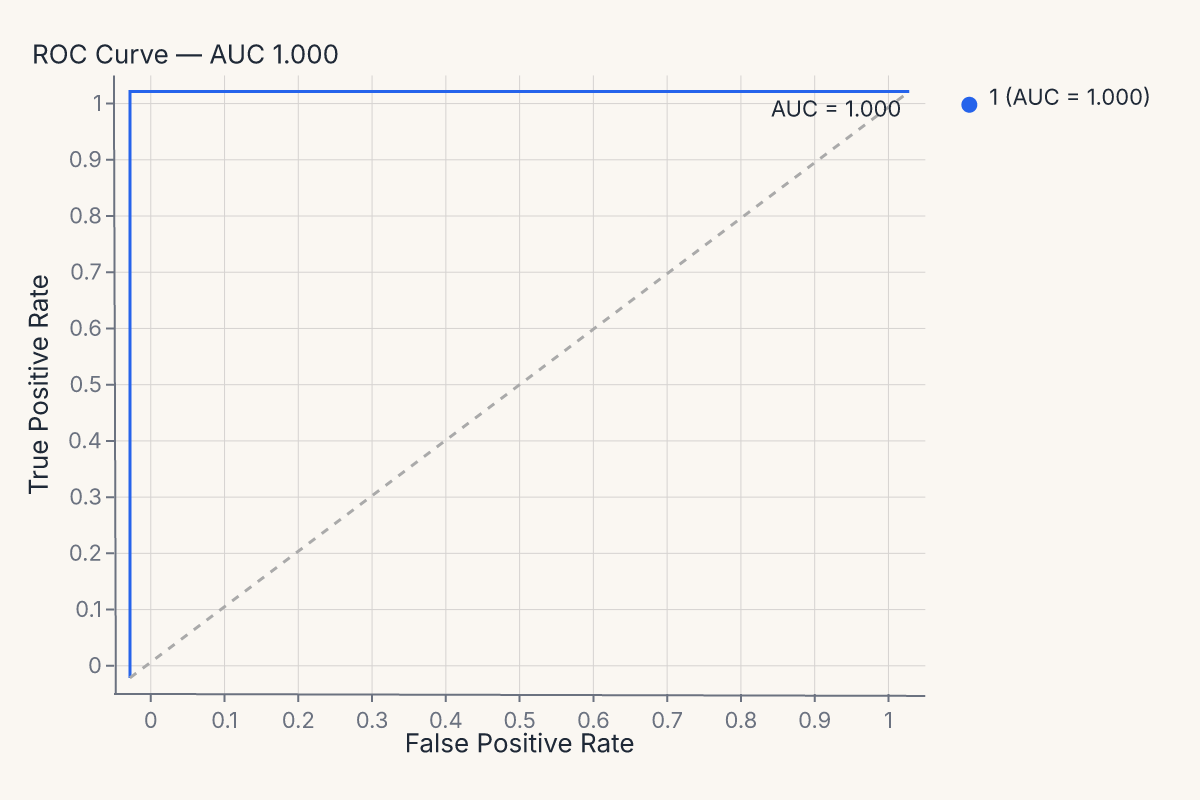
The full visualizer menu mirrors the helpers:
| Family | Visualizers |
|---|---|
| Classification | ROCVisualizer, PRVisualizer, CalibrationVisualizer, ConfusionMatrixVisualizer, ClassificationReportVisualizer, ClassPredictionErrorVisualizer, ClassBalanceVisualizer, DiscriminationThresholdVisualizer |
| Regression | ResidualsVisualizer, PredictionErrorVisualizer, CooksDistanceVisualizer |
| Explanation | FeatureImportancesVisualizer, SHAPVisualizer, SHAPBeeswarmVisualizer, SHAPBarVisualizer, SHAPWaterfallVisualizer |
| Model selection | LearningCurveVisualizer, ValidationCurveVisualizer, CVScoresVisualizer, AlphaSelectionVisualizer |
| Clustering / manifold | SilhouetteVisualizer, ElbowVisualizer, ManifoldVisualizer, InterclusterDistanceVisualizer, PCAVarianceVisualizer, Rank1DVisualizer, Rank2DVisualizer, ParallelCoordinatesVisualizer |
Pick the helper when you want the diagnostic with minimal ceremony. Pick the visualizer when you want CV-fold lifecycle, custom training/scoring splits, or compatibility with code patterns from yellowbrick.
Customizing diagnostic output
Every diagnostic helper accepts four override keywords for customization without dropping to the grammar API:
| Keyword | What it does |
|---|---|
mark= |
Override or suppress sub-layers by name. |
encode= |
Override encoding channels. |
properties= |
Override chart properties (title, width, height). |
layers= |
Append extra layers on top. |
Diagnostic charts are composites with named sub-layers. Inspect them with .layer_names:
import ferrum as fm
from sklearn.datasets import load_breast_cancer
from sklearn.ensemble import RandomForestClassifier
from sklearn.model_selection import train_test_split

data = load_breast_cancer()
X_train, X_test, y_train, y_test = train_test_split(data.data, data.target, random_state=0)
model = RandomForestClassifier(n_estimators=20, random_state=0).fit(X_train, y_train)

chart = fm.roc_chart(model, X_test, y_test)
names = chart.layer_names
assert "line" in names
assert "reference" in names
Override sub-layers by name — suppress them with False, or merge mark kwargs with a dict:
import ferrum as fm
from sklearn.datasets import load_breast_cancer
from sklearn.ensemble import RandomForestClassifier
from sklearn.model_selection import train_test_split

data = load_breast_cancer()
X_train, X_test, y_train, y_test = train_test_split(data.data, data.target, random_state=0)
model = RandomForestClassifier(n_estimators=20, random_state=0).fit(X_train, y_train)

chart = fm.roc_chart(
    model, X_test, y_test,
    mark={"line": {"stroke_width": 3}},
    properties={"title": "ROC — Random Forest"},
)
chart
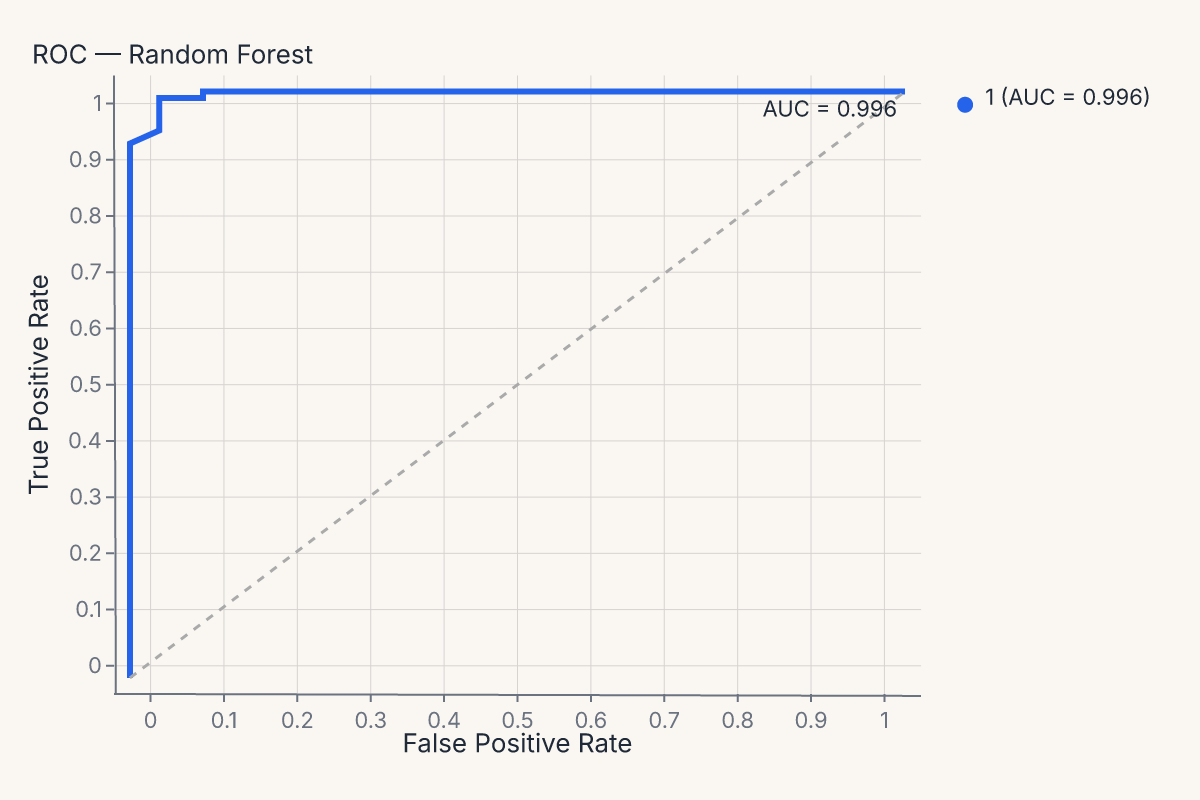
The same mark=, encode=, properties=, layers= pattern works on every diagnostic helper — confusion_matrix_chart, calibration_chart, importance_chart, and all the rest.
Diagnostics compose with everything else
The most important property of these helpers is structural: their output is a regular Ferrum chart. That means a ROC curve participates in the rest of the grammar identically to a scatter plot:
- Theme it with
.theme(fm.themes.publication)or set a process default withset_default_theme. - Save it with
.save("roc.svg"). - Concatenate it with
|or&(as shown above). - Pass it through anywhere a
Chartis expected.
A four-panel model report is (roc | cm) & (residuals | importances) — same composition operators as any other compound view. There is no separate API for "make these diagnostic charts work together."
Caveats and limitations
A few sharp edges worth knowing:
- SHAP and shap-style helpers: require
shapinstalled. They lazy-import on first call; install the optionalferrum-viz[shap]extra to pull it in. UMAP runs in pure Rust viamanifolds-rs— no Python dependency. - Per-class breakdowns: classifier diagnostics default to a per-class view when the model has more than two classes. Pass
per_class=Falseto collapse to a macro / micro / weighted average. - Compare multiple models: most classification helpers accept a
compare=keyword (or aComparedModelSourcedata source) for side-by-side comparison. See the API reference for the per-helper signatures. - Non-sklearn models: any estimator exposing
predict()andpredict_proba()works (XGBoost, LightGBM, CatBoost, etc.). For frameworks without sklearn-compatible APIs (PyTorch, TensorFlow), use they_true=/y_pred=precomputed path described above.
Where to go next
- Model outputs are data for the design rationale behind treating diagnostics as charts.
- Figure-level helpers for the broader family of one-line chart helpers (most diagnostic helpers follow the same pattern).
- Composition for the operators (
+,|,&) used to compose multiple diagnostics into a single model report. - Themes for applying consistent styling to a multi-chart diagnostic view.
- The API Reference / plots for the full signatures of every
*_charthelper, and API Reference / visualizers for every*Visualizerclass.